
See the work, the spend, and the runway.
Insights is one read-only page served by your own broker at 127.0.0.1. It opens with what is waiting for you, then shows what your agents used, what those tokens would cost at published rates, how much quota each account has left, and whether routing is healthy.
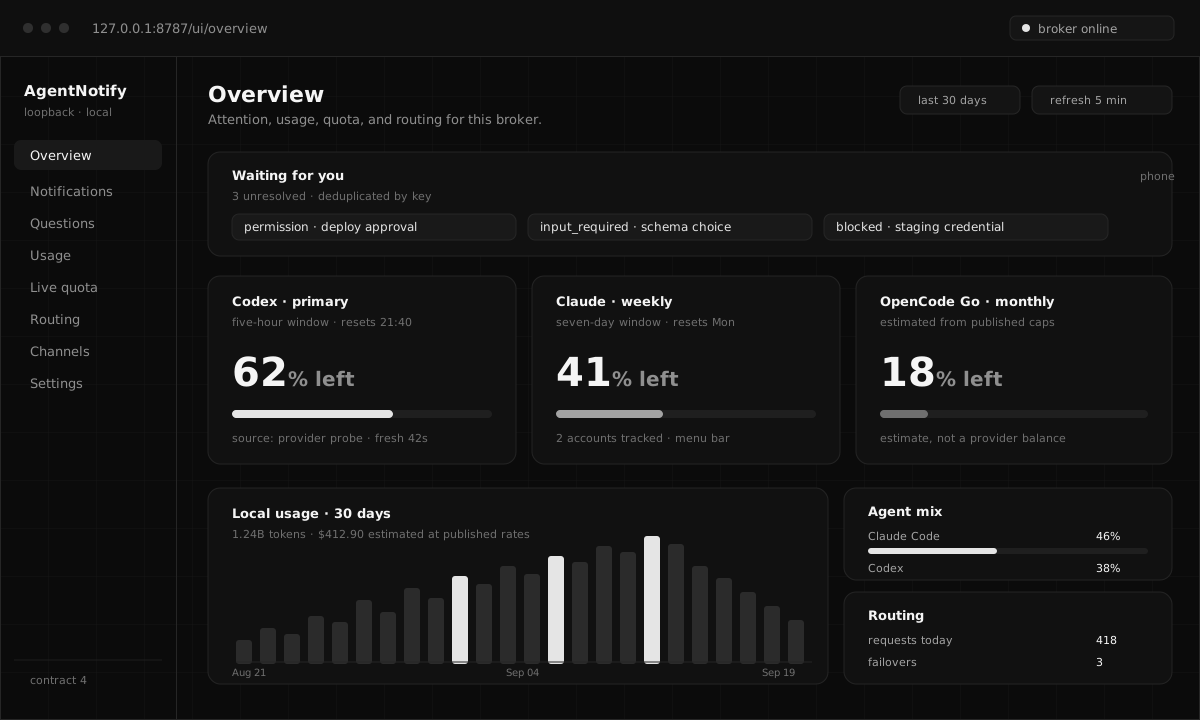
Not a wall of charts.
Each block answers a different question, keeps its own source, and stays quiet when there is nothing to report.
Usage and quota are never mixed.
Local usage is derived from the records your agents already write. Live quota is a provider snapshot fetched on demand and cached for a few minutes. The dashboard labels each one, shows when a value is stale, estimates Go plans from published caps rather than pretending to be a provider balance, and leaves a record unpriced when no published rate covers it.
- No prompt, response, or credential text ever enters a usage or routing report.
- Account config stores profile labels and paths, never copied credentials.
- The page is owner-only on loopback: foreign hosts and cross-site state changes are rejected.
- Nothing is uploaded. There is no telemetry and no analytics service.
$ agentnotify ui

# opens http://127.0.0.1:8787/ui/overview
#
#   Overview      attention · usage · quota · routing
#   Notifications full local history and filters
#   Questions     waiting interactions and answers
#   Usage         tokens, projects, sessions, cost
#   Live quota    provider windows per account
#   Routing       targets, combos, ledger, connectors
#
# the API stays on loopback behind the bearer tokenInstall, then open the dashboard.
The web interface ships with the broker on every platform, so there is nothing extra to deploy.
install.sh on macOS and Linux.agentnotify ui and the overview opens with attention, usage, quota, and routing.